

source on Google
Signs your website is losing clients are often invisible to the business owner. You put time and money into building the site. You check the homepage once, think it looks decent, and move on. Meanwhile, visitors land on a slow page or a confusing layout and leave within seconds. No enquiry. No sale. No second chance.
Here are 10 signs your website is losing you clients right now and what you can do to fix each one. If your site ticks even three of these boxes, your website conversion rate is almost certainly lower than it should be.
Sign 1: Your Page Takes More Than 3 Seconds to Load
This is the biggest silent killer of website leads. Google’s own research shows that 53% of mobile visitors abandon a page that takes longer than 3 seconds to load. Every extra second of load time reduces your website conversion rate by roughly 7%.
If your website was built on a page builder like Elementor, Divi, or WPBakery, it is almost certainly loading dozens of unnecessary scripts and stylesheets on every single page. That bloat adds up fast, and your Google rankings suffer because of it.
How to check it:
Go to PageSpeed Insights and enter your URL. If your mobile score is below 70, you have a serious slow-loading website problem.
What to do:
The fix ranges from simple steps (compress your images, switch to a faster host) to a complete rebuild using clean, hand-coded WordPress instead of a page builder. A proper rebuild consistently gets 90-plus PageSpeed scores.
Fixing a slow-loading website is one of the fastest ways to reverse the signs your website is losing clients to competitors.
Sign 2: You Have No Clear Call to Action on the Homepage
Most visitors will not hunt for your contact details. This is one of the most common signs your website is losing clients. No clear next step means no enquiry.
Most visitors will not hunt for your contact details. If your homepage does not tell them exactly what to do next, they will do nothing. This alone destroys website lead generation before it even starts.
Look at your homepage right now. Is there a clear button above the fold? Does it say something specific like “Book a Free Consultation” or “Get a Quote Today”? Or is it buried at the bottom after three paragraphs of text about your mission statement?
What to do: Place a single, specific call to action in the hero section. Use action words. Tell the visitor exactly what happens when they click. Remove anything that competes with that button for attention.
Sign 3: Your Website Looks Wrong on Mobile
More than 60% of web traffic worldwide now comes from mobile devices. If your website breaks on a phone screen, you are handing those visitors straight to your competitors. A mobile-friendly website is no longer optional for any business in the US, UK, Australia, or Canada.
Common mobile problems include text that is too small to read without zooming in, buttons placed too close together to tap accurately, images that stretch or overflow the screen, and pop-ups that cover the entire screen with no clear close button.
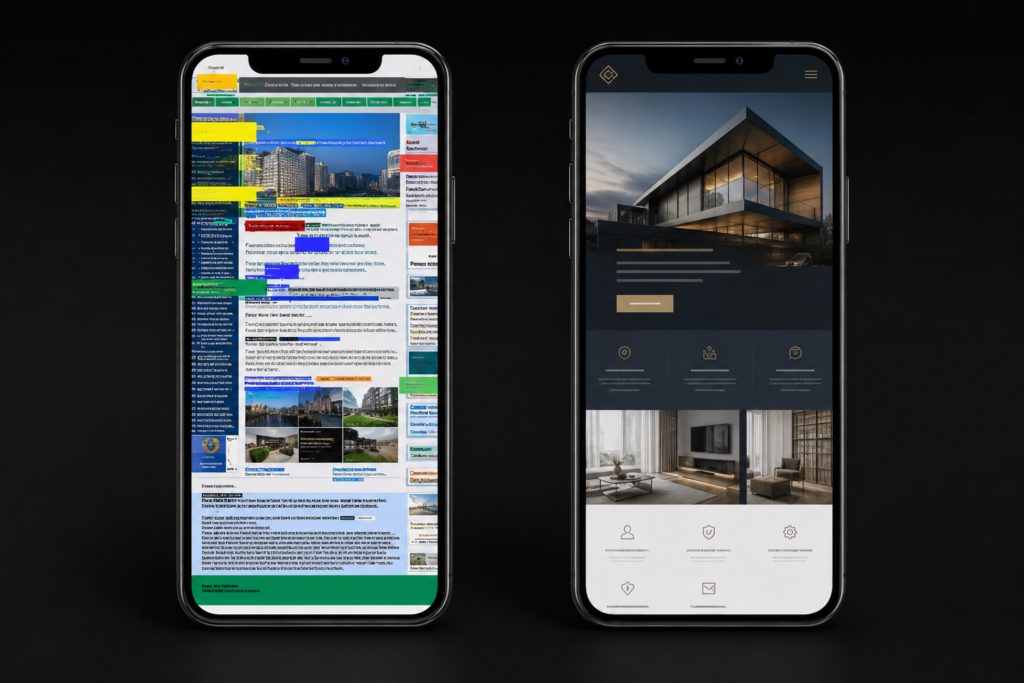
How to check it: Open your website on your phone right now. Not just the homepage. Click through to a service page and your contact form. Does everything work properly?
What to do: If your site was not built mobile-first, a redesign is almost always the most efficient fix. Patching a desktop-first site for mobile is slow and never fully solves the problem.
Sign 4: Your Contact Form Does Not Work Properly
A broken contact form is one of the most painful Signs your website is losing clients because you never even know it is happening. Enquiry forms that go to spam, forms that fail when filled out correctly, forms with no confirmation email.
This one is far more common than most business owners realise. Enquiry forms that send submissions straight to a spam folder. Forms that show a generic error when filled out correctly. Forms with too many required fields. Forms that never send a confirmation email. Any one of these means you are losing leads you never even knew existed.
How to check it: Fill out your own contact form using a personal email address. Check that you receive the submission. Check that the person who filled it in gets a confirmation. Check your spam folder. Do this every month.
What to do: Switch to a reliable form plugin such as WPForms or Gravity Forms, connect it to your email provider correctly, and test it on a real device regularly.
Sign 5: You Have No Social Proof Above the Fold
People trust people, not businesses. One of the clearest signs your website is losing clients is the complete absence of social proof. If a visitor arrives and sees nothing but your own claims about how good you are, they have no reason to believe you. Social proof is one of the strongest drivers of website lead generation and most sites get it completely wrong.
Reviews, client logos, testimonials, case study results, Google star ratings. These convert a sceptical visitor into an enquiry. But most business websites bury them at the very bottom of the page, or on a separate testimonials page that nobody visits.
What to do: Move at least one strong testimonial or a set of review stars into the top section of your homepage. The visitor should see social proof within the first scroll, not the last.
Sign 6: Your Website Has No Clear Value Proposition
This is one of the most overlooked signs your website is losing clients: a weak or missing value proposition on the homepage. Can a first-time visitor understand what you do, who you serve, and why you are better within 5 seconds of landing on your homepage? If your headline says something like “Welcome to [Business Name]” or “Delivering Excellence Since 2009,” the answer is no.
Vague headlines are one of the most common signs your website is losing clients. Visitors do not give you time to explain yourself further down the page if the opening line does not immediately speak to them.
What to do: Rewrite your homepage headline to answer three questions in one sentence: what you do, who you do it for, and what outcome you deliver. A strong example: “We build fast WordPress websites for UK service businesses that want more enquiries from Google.”
Sign 7: Your Website Has No Blog or Content
A website with no blog is effectively invisible to Google. Search engines rank websites that publish useful, relevant content regularly. Without a blog, you depend entirely on people already knowing your business name to find you. You get zero organic traffic from people searching for what you offer.
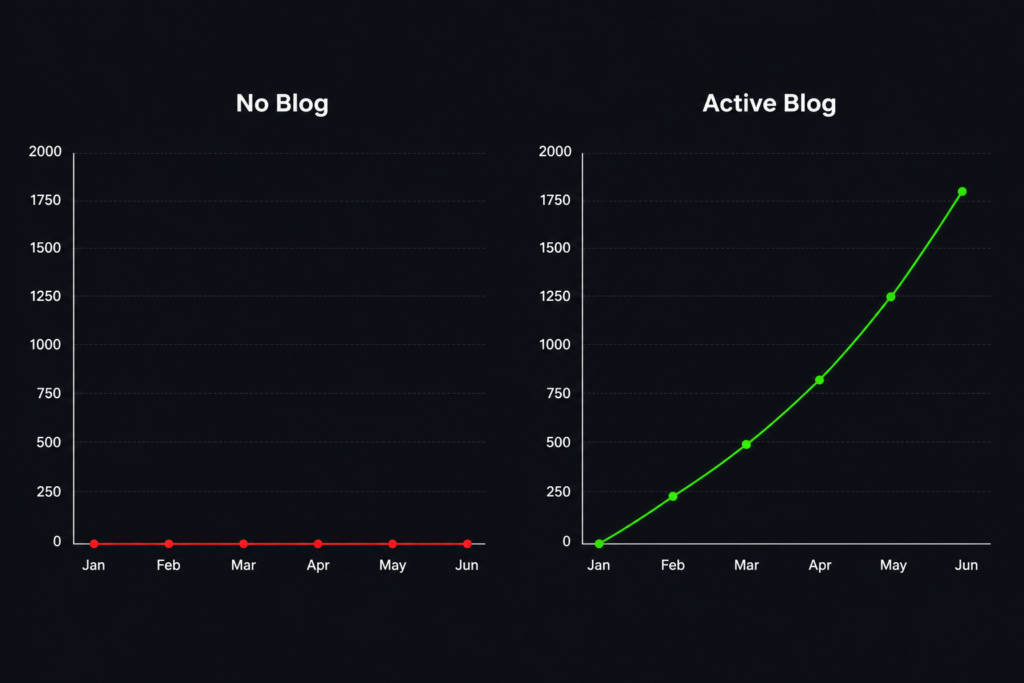
This is one of the clearest signs your website is losing clients long-term. Your competitors who blog consistently are capturing all the search traffic that should be coming to you.
What to do: Start publishing at least two blog posts per month. Answer the questions your ideal clients are already searching for on Google. Even a simple 900-word post answering a common question in your industry can rank within weeks if the topic is not too competitive.
Sign 8: Your Website Is Not Secure
A missing SSL certificate is one of the most damaging signs that your website is losing clients before they even read a single word. If your URL starts with “http://” instead of “https://”, every major browser shows visitors a “Not Secure” warning.
Even if you have an SSL certificate installed, a misconfiguration can trigger the same warnings. Mixed content errors (where images or scripts still load over the old HTTP connection) are especially common on older WordPress sites.
How to check it: Look at your browser address bar right now. Is there a padlock icon? Click it. Does it say “Connection is secure”?
What to do: Install a free SSL certificate (most quality hosts provide Let’s Encrypt at no cost), then make sure all internal links, images, and scripts load over HTTPS and not the old HTTP version.
Sign 9: Your Website Has No SEO Basics in Place
Title tags, meta descriptions, heading structure, image alt text, internal links. These are not optional extras. Missing them is one of the most overlooked signs your website is losing clients to better-optimised competitors. They are the foundations of WordPress website SEO and the signals Google uses to decide whether to show your website to people searching for what you offer.
Without these basics in place, you simply do not rank. It does not matter how good your services are or how well-designed your pages look.
How to check it: Install RankMath or Yoast SEO. Open any page on your site and look at the SEO score. A score below 70 means there are significant gaps to fix.
What to do: Fix your title tags first (include your main keyword and location if your business is location-based). Then write a unique meta description for every page. Then confirm that each page has exactly one H1 tag and clear H2 subheadings throughout. These basics alone can move you up in Google rankings within weeks of implementation.
Sign 10: Your Website Has Not Been Updated in More Than a Year
Outdated content is one of the easiest signs your website is losing clients to spot and fix. Blog posts from two or three years ago, case studies referencing old clients, a Latest Projects section showing work from 2021, or a copyright notice still showing 2023 in the footer.
Outdated content includes blog posts from two or three years ago, case studies referencing old clients, a “Latest Projects” section showing work from 2021, or copyright notices that still say 2023 in the footer.
There is also a practical security side to this. WordPress core, plugins, and themes need regular updates to stay secure and perform properly. An unupdated site is vulnerable to hackers and often significantly slower than it could be.
What to do: Review your website content every three months. Update dates, refresh testimonials, add new project examples. Keep your WordPress installation, theme, and all plugins updated every single month without fail.
How Many of These Signs Apply to Your Website?
If you spotted 3 or more of these signs, your website is losing clients, and your site is actively costing you business right now. Each sign is a leak in your pipeline. Visitors arrive, hit a problem, and leave before they ever get to enquire.
If you spotted 3 or more of these warning signs on your own site, your website is actively costing you clients right now. Each sign is a leak in your pipeline. Visitors arrive, hit a problem, and leave before they ever get to enquire.
Every single one of these signs that your website is losing clients is fixable, some in an afternoon, others with a proper rebuild.
The good news is that every single one of these problems is fixable. Some take an afternoon. Others need a proper rebuild. But the businesses that fix them see real, measurable results: more Google traffic, more enquiries, more paying clients.
Frequently Asked Questions
How do I know if my website is losing clients?
The clearest signs your website is losing clients include a high bounce rate above 70%, a PageSpeed score below 60 on mobile, very few or zero enquiries from the contact form, and no organic traffic from Google. Run a free check on PageSpeed Insights and Google Search Console to get a clear picture.
What is a good PageSpeed score for a website?
A score of 90 or above on both desktop and mobile is considered excellent. A score between 70 and 89 is acceptable but has room for improvement. Anything below 70 on mobile is a serious problem that will hurt your Google rankings and push visitors away before they even read your content.
How long does it take to fix a slow WordPress website?
Simple fixes like image compression, caching, and switching hosts can be done in a day and can improve your score by 10 to 20 points. A full rebuild from a page builder to clean custom WordPress code typically takes 2 to 4 weeks but delivers consistent 90 plus scores and lasting SEO improvements.
Can a bad website hurt my Google rankings?
Yes, directly. Google uses Core Web Vitals including page speed, mobile usability, and layout stability as ranking signals. A slow or broken website will rank lower than a faster competitor even if your content is better. This is one of the main reasons fixing technical issues improves both traffic and leads.
How much does a WordPress website redesign cost?
A professional custom WordPress redesign typically ranges from $1,500 to $8,000 depending on the size of the site, the complexity of features needed, and whether e-commerce is involved. At CrestVox Studio we provide a free website review first so you know exactly what needs fixing before committing to anything.
Not Sure Where Your Website Stands?
At CrestVox Studio, we offer a completely free website review. Share your URL, and we will send you a clear breakdown of what is working, what is not, and exactly what to prioritise first. No cost, no obligation. We reply within 24 hours.
Related Articles
- How to Hire a WordPress Developer in India
- WordPress Website Development Cost India
- Get a Free Website Audit
CrestVox Studio helps Indian and UK businesses build fast, conversion-ready WordPress and Shopify websites. Get a Free Consultation to discuss your project.