

source on Google
A WordPress maintenance service handles everything your site needs to stay secure, fast, and online after it goes live. Core updates, plugin updates, security patches, backups, uptime monitoring, all of it needs to happen consistently or your site becomes a liability. This guide covers exactly what a WordPress maintenance service includes, what separates a good one from a bad one, and what you should expect to pay in 2026.
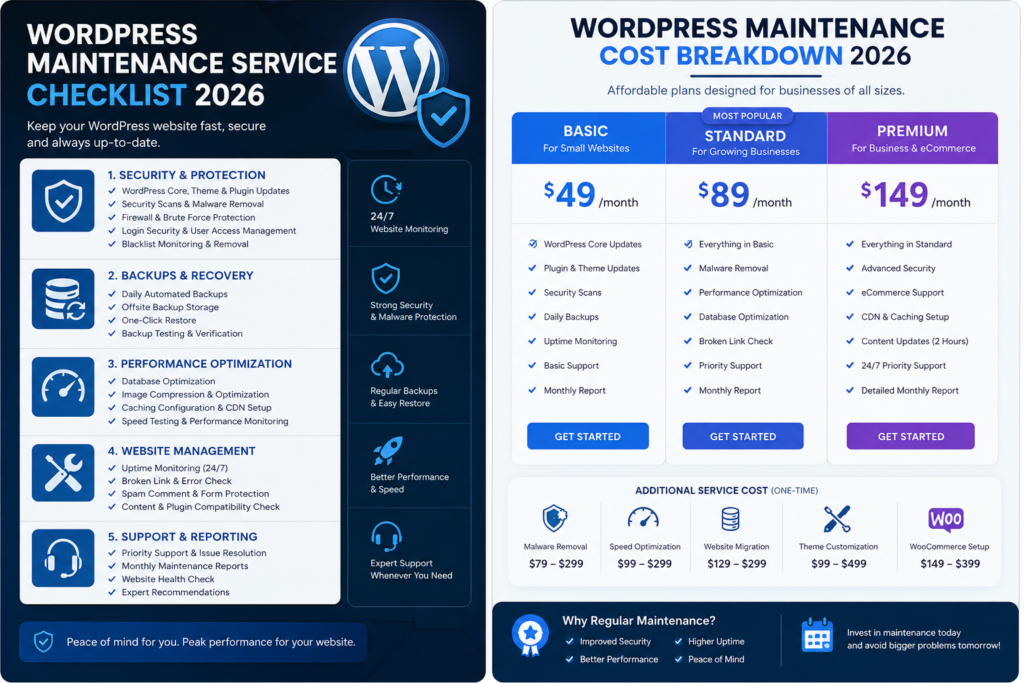
Why You Need a WordPress Maintenance Service
WordPress is the most targeted CMS for malicious attacks, not because it is insecure by design but because it is so widely used. Outdated plugins and themes are responsible for the overwhelming majority of WordPress security breaches. A site without an active WordPress maintenance service is a site waiting to be compromised. Beyond security, unmaintained WordPress sites accumulate technical debt over time. Plugin conflicts, deprecated functions, and database bloat all degrade performance in ways that are not immediately obvious but directly affect both user experience and search rankings.
Over 97% of WordPress vulnerabilities come from outdated plugins and themes, not WordPress core. A maintenance service closes these gaps before they become incidents.
Patchstack WordPress Security Report
What a WordPress Maintenance Service Includes
A quality WordPress maintenance service covers several distinct areas. Here is what each one involves and why it matters.
WordPress Core Updates
WordPress releases major and minor updates throughout the year. Major updates can include significant changes that affect how themes and plugins behave. A proper WordPress maintenance service updates WordPress core in a staging environment first, tests for conflicts, then applies the update to production. Simply clicking update on a live site without testing is not maintenance. It is a risk.
Plugin and Theme Updates
Plugins are the most common attack vector on WordPress sites. Keeping them updated closes known security vulnerabilities. A quality WordPress maintenance service does not just click update on every plugin automatically. It tests each update against the site’s specific environment to catch conflicts before they cause downtime or visual breakage on the live site.
Automated Off-Server Backups
Daily backups stored off-server are non-negotiable in any serious WordPress maintenance service. If your hosting server fails or your site is compromised, backups stored on the same server account are useless. A proper maintenance plan stores backups on a separate cloud location such as Amazon S3 or Google Drive, completely independent of your hosting provider.
Security Monitoring
Active monitoring for malware, unexpected file changes, and suspicious login attempts is a core part of any WordPress maintenance service. This is different from installing a security plugin and leaving it running. Active monitoring means your maintenance provider is alerted to threats in real time and acts on them rather than waiting for you to notice something is wrong.
Uptime Monitoring
Your site going offline at 2am on a Wednesday is not something you will notice until a client emails you. Uptime monitoring checks your site every few minutes and alerts your WordPress maintenance service provider the moment it goes offline. Fast response to downtime means most outages are resolved before they affect your business or your search rankings.
Performance Checks
Regular checks on page speed, Core Web Vitals scores, and database performance are part of a complete WordPress maintenance service. Catching a performance degradation early, before it affects rankings or conversions, is far easier than recovering from a drop that has already happened. A site that scored 90 on PageSpeed at launch should still score 90 six months later.
Minor Content and Technical Edits
Most WordPress maintenance service plans include a set number of development hours each month for small tasks such as updating a phone number, fixing a broken link, adjusting a form field, or troubleshooting a plugin conflict. This is the practical day-to-day support that keeps a site running smoothly without requiring a new project or a separate support contract for every minor change.
WordPress Maintenance Service Cost in 2026
| Plan Type | Monthly Cost (USD) | What Is Included |
|---|---|---|
| Basic WordPress Maintenance Service | $50 to $100 | Updates, backups, uptime monitoring |
| Standard WordPress Maintenance Service | $100 to $250 | Above plus security monitoring and 1 to 2 hours of edits |
| Premium WordPress Maintenance Service | $250 to $500 | Above plus performance checks and priority support |
| Agency WordPress Maintenance Service | $500 to $1,500 | Full management, dedicated developer hours, SLA guarantees |
DIY WordPress Maintenance vs Hiring a Service
You can handle WordPress maintenance yourself. The real question is whether it is worth your time. A WordPress maintenance service costing $100 to $200 per month covers tasks that take a business owner or non-technical team member 3 to 4 hours per month to do properly. At any reasonable hourly value of your time, outsourcing to a professional WordPress maintenance service is a straightforward financial decision. It also eliminates the risk of mistakes made by someone without the technical knowledge to handle a plugin conflict or security incident correctly. According to Patchstack’s security research, sites under active maintenance have dramatically lower rates of successful attacks than sites managed without dedicated maintenance.
A WordPress maintenance service costing $150 per month is almost always cheaper than the time you spend doing it yourself, and far cheaper than recovering from a security incident.
What to Look for in a WordPress Maintenance Service Provider
- Off-server backups with a tested restoration process, ask how long a full site restore takes and when they last tested it
- Staging environment for updates, updates should be tested before they touch your live site
- Response time guarantees for security incidents and downtime, vague promises are not commitments
- Monthly reporting showing exactly what was done, what was found, and what was fixed
- Clear scope defining what is covered by the monthly fee and what falls outside it as a billable task
WordPress Maintenance Service at CrestVox Studio
CrestVox Studio provides WordPress maintenance service for businesses in the US, UK, Australia, Canada and India. Our maintenance plans include core and plugin updates tested in staging, daily off-server backups, uptime monitoring, security scanning, and a set number of development hours each month for content and technical changes. Every CrestVox maintenance client gets monthly reporting showing exactly what was done on their site.
If your WordPress site does not currently have a WordPress maintenance service in place, contact CrestVox Studio to discuss a plan that fits your site’s needs and budget.
Frequently Asked Questions
What does a WordPress maintenance service include?
A WordPress maintenance service typically includes WordPress core updates, plugin and theme updates, off-server backups, security monitoring, uptime monitoring, performance checks, and a set number of development hours for minor content and technical edits each month.
How much does a WordPress maintenance service cost in 2026?
A basic WordPress maintenance service costs $50 to $100 per month. A standard plan with security monitoring and minor edits costs $100 to $250. Premium plans with performance optimisation and priority support cost $250 to $500. Agency plans with dedicated developer hours start from $500 per month.
Do I need a WordPress maintenance service if my site is small?
Yes. Small sites are just as vulnerable to security incidents as large ones. The damage of a compromised site, lost rankings, and recovery costs applies regardless of site size. A basic WordPress maintenance service plan at $50 to $100 per month is worthwhile for any live business website.
Does CrestVox Studio offer a WordPress maintenance service?
Yes. CrestVox Studio provides WordPress maintenance service plans for businesses in the US, UK, Australia, Canada and India. Plans include staged updates, off-server backups, security monitoring, uptime monitoring, and monthly reporting. Contact CrestVox Studio to discuss a plan for your site.
What happens if my WordPress site gets hacked without a maintenance service?
A hacked WordPress site can result in your site being blacklisted by Google, your hosting account suspended, customer data exposed, and significant recovery costs for malware removal and site restoration. Without off-server backups, recovery may not be possible at all. A WordPress maintenance service prevents most incidents from occurring in the first place.
How is CrestVox Studio different from other WordPress maintenance service providers?
CrestVox Studio maintenance clients receive monthly reports showing exactly what was done on their site. Updates are tested in staging before touching the live site. Every CrestVox maintenance plan includes performance monitoring to catch speed degradation before it affects rankings. We treat maintenance as active care, not just a scheduled update run.