

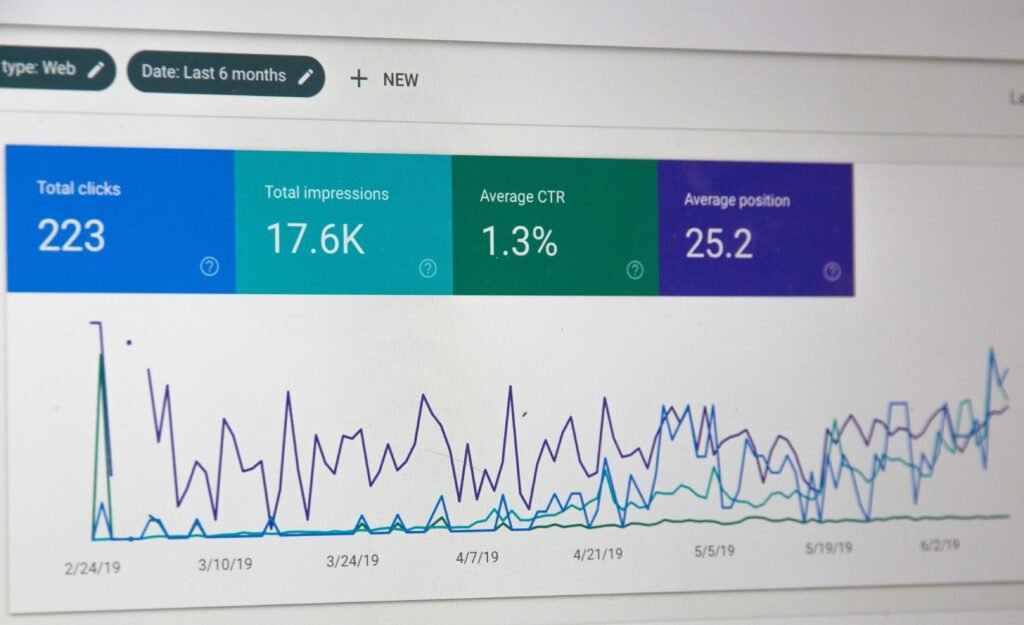
source on Google
What Is a Website SEO Audit?
A website SEO audit is a systematic review of a website’s technical setup, content, internal links, performance, and search engine accessibility. It helps identify problems that may prevent search engines from crawling, indexing, and understanding important pages.
A website may look attractive and work perfectly for visitors but still have SEO problems. Search engines might encounter blocked pages, incorrect canonical tags, broken internal links, duplicate content, or slow-loading resources.
A comprehensive website SEO audit examines five main areas:
- Technical SEO: Crawling, indexing, redirects, XML sitemaps, and canonical tags.
- On-page SEO: Titles, meta descriptions, headings, and content relevance.
- Website performance: Loading speed, Core Web Vitals, and mobile experience.
- Internal linking: Broken links, orphan pages, and website architecture.
- Content quality: Search intent, duplicate content, outdated information, and content gaps.
The objective is to identify real problems and create a prioritized plan to resolve them. An audit does not guarantee higher rankings, but it can help remove technical obstacles and improve the overall search experience.
Table of Contents
- What Is a Website SEO Audit?
- Why Is a Website SEO Audit Important?
- The Ultimate 25-Point Website SEO Audit Checklist
- Best Free Website SEO Audit Tools
- How to Audit a WordPress Website
- How to Audit a Shopify Website
- How Often Should You Perform an SEO Audit?
- Frequently Asked Questions
- Conclusion
Why Is a Website SEO Audit Important?
Regular website SEO audits help businesses understand why important pages might not perform as expected in organic search.
An audit can reveal issues such as:
- Important pages missing from Google’s index.
- Broken links and unnecessary redirect chains.
- Poor mobile performance and slow-loading images.
- Missing or duplicated page titles.
- Weak internal linking between related pages.
- Outdated content that no longer satisfies search intent.
- Technical problems introduced during a website redesign.
For businesses using WordPress, Shopify, WooCommerce, or custom development, regular audits also help detect problems introduced by themes, plugins, apps, and website updates.
The Ultimate 25-Point Website SEO Audit Checklist
Use this website SEO audit checklist to review your website systematically. Start with crawling and indexing issues before spending time on smaller metadata improvements.
1. Check Google Indexing
Start by reviewing which pages Google has indexed.
Open Google Search Console and review the Page Indexing report. Use URL Inspection to investigate important pages that are missing from search results.
How to fix it:
- Confirm that important pages return successful HTTP responses.
- Check for accidental
noindexdirectives. - Review robots.txt restrictions.
- Verify canonical URLs.
- Submit an accurate XML sitemap.
Not every URL needs to be indexed. Focus on useful pages that should appear in search results.
2. Review Your Robots.txt File
The robots.txt file provides crawling instructions to compliant search engine crawlers.
Visit yourdomain.com/robots.txt and verify that important sections of your website are not unintentionally blocked.
Check for rules that restrict access to important resources or content directories. Remember that robots.txt is not a reliable way to prevent a URL from appearing in search results.
3. Find Accidental Noindex Directives
A noindex directive tells compliant search engines not to include a page in their search results.
This can be useful for pages that should remain excluded, but an accidental directive can prevent an important service page, product page, or blog post from appearing in Google.
Inspect the page’s robots meta tag, relevant HTTP headers, and SEO plugin settings. Remove unintended directives and allow search engines to recrawl the page.
4. Audit Your XML Sitemap
An XML sitemap helps search engines discover important URLs.
Make sure your sitemap contains canonical, indexable pages that return successful responses. Remove obsolete URLs, unnecessary redirects, and pages that should not be indexed.
Submit your sitemap through Google Search Console and check for reported processing errors.
A sitemap helps with discovery but does not guarantee indexing.
5. Find and Fix Broken Links
Broken internal links send visitors and crawlers to missing pages or incorrect destinations.
Use a website crawler such as Screaming Frog SEO Spider to identify internal links pointing to 404 URLs.
Fix broken links by updating the destination, restoring a missing page where appropriate, or redirecting a permanently moved page to a relevant replacement.
Avoid redirecting unrelated URLs to the homepage just to eliminate errors.
6. Check Redirects and Redirect Chains
Redirects are necessary when URLs change, but long redirect chains and loops can create problems.
During your website SEO audit, check for:
- Redirect loops.
- Multiple redirects before reaching the final URL.
- Internal links pointing to redirected URLs.
- Important old URLs returning 404 errors.
- Redirects leading to irrelevant pages.
Update internal links to point directly to the final destination wherever practical.
7. Verify Canonical Tags
Canonical tags indicate the preferred URL among duplicate or very similar pages.
Incorrect canonical tags may point to unrelated URLs, redirected pages, or the wrong product or article version.
Review canonical tags on important pages and check for inconsistencies involving URL parameters, trailing slashes, and HTTP versus HTTPS.
Canonical tags are signals rather than absolute instructions, so search engines may select a different canonical URL.
8. Check HTTPS Configuration
Your website should use HTTPS consistently.
Look for:
- HTTP URLs that do not redirect appropriately.
- Mixed-content warnings.
- Invalid SSL certificates.
- Internal links that still use HTTP.
- Inconsistent canonical URLs.
Resolve these issues to maintain a secure, consistent browsing experience.
9. Test Website Speed
Website performance affects usability, and slow pages can frustrate visitors.
Use Google PageSpeed Insights to examine representative pages and identify performance bottlenecks.
Pay particular attention to:
- Oversized images.
- Render-blocking resources.
- Excessive JavaScript.
- Slow server responses.
- Unnecessary third-party scripts.
- Poor caching configuration.
Optimize images, reduce unnecessary scripts, and improve caching where appropriate. Measure the results instead of installing multiple overlapping optimization plugins.
10. Review Core Web Vitals
Core Web Vitals measure important aspects of real-world page experience.
The current key metrics are:
- LCP — Largest Contentful Paint: A good result is 2.5 seconds or less.
- INP — Interaction to Next Paint: A good result is 200 milliseconds or less.
- CLS — Cumulative Layout Shift: A good result is 0.1 or less.
These thresholds are assessed at the 75th percentile of page visits.
Use PageSpeed Insights and Google Search Console to investigate issues. Field data reflects real-user experiences when available, while lab data provides controlled diagnostic measurements.
11. Test Mobile Responsiveness
A website should remain readable and usable on mobile devices.
Check navigation, text size, buttons, forms, tables, product pages, and checkout flows on smaller screens.
Use responsive layouts and test real user journeys. Ensure important content and links remain accessible across screen sizes.
12. Optimize Page Titles
Every important page should have a descriptive title that accurately reflects its content.
Avoid vague titles, unnecessary keyword repetition, and identical titles across unrelated pages.
For example:
Weak: Home | Welcome to Our Website
Better: WordPress Development Services for Growing Businesses
Write titles for users and search intent. Google may generate a different title link in search results.
13. Improve Meta Descriptions
Write unique meta descriptions that explain what visitors can expect from each important page.
A good description should be relevant, readable, and specific. Avoid copying the same description across dozens of pages or stuffing it with keywords.
Google may generate a different snippet depending on the search query. Meta descriptions are not a direct ranking factor.
14. Review Heading Structure
Use headings to organize information logically.
Each page should have a clear main heading and descriptive subheadings that help visitors scan the content.
Avoid creating headings solely to repeat the focus keyword. The structure should make the content easier to understand.
15. Optimize Images and Alt Text
Images can improve understanding, but oversized files may slow down pages.
During your website SEO audit, review image dimensions, file sizes, formats, and alternative text.
Use descriptive alt text for meaningful images. For example:
Image filename: website-seo-audit-checklist.webp
Alt text: Website SEO Audit checklist showing technical SEO and indexing checks
Use empty alt text for purely decorative images where appropriate. Do not force the focus keyword into every image’s alt text.
16. Find Orphan Pages
Orphan pages have no internal links pointing to them from the pages included in your analysis.
These pages may be difficult for visitors and crawlers to discover through normal website navigation.
Add relevant contextual links, connect pages through appropriate categories, and confirm that each page serves a useful purpose.
17. Strengthen Internal Linking
Internal links connect related content and help visitors navigate your website.
For example, an article about WordPress performance can link to a relevant WordPress development or website optimization service page.
Use descriptive anchor text, connect related blog posts, and ensure important service pages receive relevant internal links.
Only link to pages that genuinely help the reader.
18. Identify Duplicate Content
Similar pages may target the same search intent or offer little additional value.
Compare pages that cover nearly identical topics. Improve genuinely different pages and consolidate overlapping content where appropriate.
If a URL is retired, redirect it only when there is a relevant replacement.
Duplicate content does not automatically trigger a penalty, and not all repeated text is harmful.
19. Evaluate Content Quality
Content should satisfy the question that brought a visitor to the page.
Review whether your content is accurate, useful, current, easy to navigate, and supported by appropriate evidence.
Use Google Search Console queries and relevant search results to identify missing subtopics and opportunities to improve existing articles.
A useful website SEO audit should evaluate content quality, not just technical warnings.
20. Validate Structured Data
Structured data helps search engines understand information about a page and can make eligible pages qualify for enhanced search appearances.
Use Google’s Rich Results Test to check supported rich-result types and the Schema.org Validator to validate general structured data.
Make sure your markup accurately represents visible page content. Valid markup does not guarantee a rich result or improved rankings.
21. Review Website Architecture
Important pages should be easy to discover through logical navigation and category structures.
Check whether your main services, blog categories, products, and supporting articles are connected logically.
Avoid unnecessarily complicated navigation and excessive category layers.
22. Improve URL Structure
Readable URLs help visitors understand where a link leads.
Clear URL: /website-seo-audit/
Less descriptive URL: /page?id=1847
Do not change existing URLs just to make them shorter. URL changes can affect established links and search visibility, so use appropriate redirects when necessary.
23. Investigate Missing Pages and HTTP Errors
Review important URLs returning 404 errors or unexpected HTTP responses.
Some missing URLs are normal, but broken internal links, valuable deleted pages, and missing resources deserve attention.
Use crawler reports, server logs, and Search Console data to investigate relevant problems.
24. Verify Analytics and Search Tracking
Reliable measurement helps you understand whether SEO improvements are working.
Check that:
- Google Search Console is verified.
- Your sitemap is submitted.
- Analytics tracking is configured correctly.
- Important conversion events are measured.
- Privacy and consent requirements are respected.
Search Console measures search performance, while analytics platforms measure on-site activity. They serve different purposes.
25. Prioritize SEO Fixes
An audit report is useful only when it leads to action.
Classify issues by their impact, affected pages, confidence, and implementation effort.
Critical issues: Accidental sitewide noindex directives, important pages blocked from crawling, or widespread server errors.
High-priority issues: Incorrect canonicals, indexing problems on important URLs, broken internal links, and significant performance problems.
Medium-priority issues: Missing titles, weak internal linking, oversized images, and content gaps.
Ongoing improvements: Content updates, navigation refinements, and broader topic coverage.
The correct order depends on your website. Fix problems affecting important pages before spending time chasing a perfect tool score.

Best Free Website SEO Audit Tools
The following tools can help you perform a website SEO audit without relying entirely on paid software.
| Tool | Primary purpose |
|---|---|
| Google Search Console | Indexing, search performance, and sitemap monitoring |
| PageSpeed Insights | Website performance and Core Web Vitals |
| Screaming Frog SEO Spider | Crawling, broken links, metadata, and technical issues |
| Rich Results Test | Testing eligible structured data |
| Schema.org Validator | General structured data validation |
| Chrome DevTools | Inspecting browser errors, network requests, and rendering |
Some tools have usage limits or paid features. Check their current terms before planning large audits.
How to Audit a WordPress Website
WordPress websites may develop technical problems because of themes, plugins, page builders, caching layers, and SEO settings.
Follow these steps:
- Check SEO plugin settings for accidental indexing restrictions.
- Review your XML sitemap.
- Test important pages with PageSpeed Insights.
- Check for duplicate metadata or structured data.
- Verify redirects after changing slugs or removing content.
- Optimize images and unnecessary frontend scripts.
- Test forms, navigation, and other important user flows after making changes.
Avoid installing multiple plugins that perform the same SEO or caching functions. Test significant changes on a staging environment where possible.
How to Audit a Shopify Website
Shopify stores need particular attention to product URLs, collection pages, product variants, theme performance, and duplicate URL patterns.
Review product and collection pages that should be discoverable. Check canonical tags, redirect rules, product images, theme scripts, and internal links to important collections.
Also investigate third-party app scripts that may affect performance.
Avoid blanket noindex rules or deleting product URLs without understanding their role in search visibility and customer navigation.
How Often Should You Perform a Website SEO Audit?
The ideal frequency depends on your website’s size and complexity.
- Monthly: Review Search Console, major indexing problems, broken links, and performance changes.
- Quarterly: Perform a broader technical and content review for most established business websites.
- After major changes: Audit after a redesign, migration, theme change, large plugin update, or URL restructuring.
Large e-commerce websites may require more frequent monitoring because they frequently add or modify URLs.
Frequently Asked Questions
What is the best free website SEO audit tool?
Google Search Console is a strong starting point for indexing and search performance. PageSpeed Insights helps identify performance issues, while a crawler such as Screaming Frog can reveal additional technical problems, subject to its current free-version limits.
Can a website SEO audit improve Google rankings?
A website SEO audit can identify issues affecting crawling, indexing, usability, and content quality. Fixing relevant problems may support better search performance, but rankings depend on many factors and are never guaranteed.
How long does a website SEO audit take?
An initial review of a small business website may take a few hours. A comprehensive audit of a large e-commerce website may require considerably more time, especially when manual review, log analysis, and validation are involved.
Is a website audit the same as an SEO audit?
A website audit may cover design, usability, accessibility, security, and performance. An SEO audit focuses on search discovery, indexing, relevance, and organic search performance. The two areas often overlap.
Should I fix every issue reported by an SEO tool?
No. Automated tools may flag low-impact or context-dependent issues. Prioritize problems affecting important URLs, users, crawling, indexing, and meaningful search opportunities rather than chasing a perfect audit score.
Conclusion
A website SEO audit gives you a structured way to identify technical problems, improve content, strengthen internal links, and make important pages easier to discover.
Start with crawling, indexing, redirects, and performance problems affecting important pages. Then review metadata, content quality, internal linking, and ongoing monitoring.
The most valuable audit is not the one with the longest list of warnings. It is the one that identifies the right problems, explains how to fix them, and measures the results.
If your website has persistent technical SEO issues or you need help prioritizing fixes, visit CrestVox Studio to learn more about our web development services.
Internal Linking Recommendations
Add contextual links to these existing CrestVox pages, if available:
- WordPress Development Services
- Shopify Development Services
- Website Optimization Services
- Contact or Website Audit Request Page